


A good sales meeting should leave both people knowing what happens next. A digital business card for sales professionals can connect the conversation to your contact details, a relevant product page, a meeting calendar or a short enquiry form. The profile does not close a deal for you; it makes the next useful action easier to find.
Explore a digital business card for sales built around the next step you want a prospect to take.
Sales conversations happen in many places: a conference, a customer visit, a product demo or a quick introduction through a mutual contact. A digital profile lets you share current details in each setting and update them later without replacing printed cards. A prospect can open the profile from a link or QR code, or through an NFC tap when you meet in person.
The advantage is focus. Instead of sending someone to search for your company, you can point them to one page that explains who you are, what you offer and how to continue. That can make a strong first impression, but the quality of the conversation and your follow-through still matter most.

A sales profile should help the person take one relevant next step. For an early-stage prospect, that may be “Book a demo.” For someone comparing options, it might be a product overview or a short case study. After a meeting, a calendar link can make it easy to schedule a deeper discussion.
Put the main action near the top and label it clearly. Use one primary button, then add secondary options such as your website, LinkedIn profile or product information. Too many competing buttons make it harder to decide. If your sales role covers several products or audiences, tailor the first screen to the meeting rather than showing every possible link.
In a face-to-face meeting, an NFC card can open your profile with a tap. A QR code works well when someone is looking at a slide, printed handout or email signature. A direct link is convenient in a follow-up message or virtual call. With Fulpio, these methods can lead to the same profile, so your details remain consistent across channels.
Keep the moment natural: offer to share the profile when the other person asks for your details or when you agree on a next step. Have the QR code or link ready in case tapping is inconvenient. Test the profile on a second phone and confirm that buttons, calendar links and contact details work before a busy event.
A contact form can help a prospect request a demo, ask a question or leave details for a follow-up. Keep it short: ask only for information you need to respond, such as a name, work email and an optional note. Explain what the person will receive and who will contact them. A form submission is a request for that specific follow-up; it should not be treated automatically as permission for unrelated marketing.
If you use a lead capture business card profile at an event, tell people what happens after they submit the form. Make the submit button specific, such as “Request a demo,” and provide a clear privacy notice where required. A transparent process builds more trust than collecting as many fields as possible.
Before the conversation ends, agree on a practical next step: send a quote, share a case study, arrange a demo or introduce a colleague. Add a brief note to your CRM or sales tracker about the prospect’s need and the promise you made. That context helps your message feel personal rather than like a generic sequence.
Follow up within the timeframe you agreed. Link to the page or resource that matches the discussion, and keep the message focused on one action. Your digital profile can support the follow-up because the contact can return to your current details and meeting link later. Update the profile when your offer or booking route changes.
Profile analytics can show views, contact saves, link clicks or form submissions, depending on the tools available in your plan. Those signals may help you see whether prospects are opening the page or which resource draws attention. Fulpio Pro includes profile analytics and custom forms; review the current plan details to check what is available for your account.
A click does not prove buying intent, and a view does not show why someone opened the profile. Compare activity with your meeting notes, replies and scheduled next steps. If prospects open the page but do not book, test a clearer button or simpler booking flow. Change one thing at a time so you can learn what helps.
For contact forms and profile activity, see Fulpio Pro analytics and forms.

Start with your name, role, company and a concise description of the customers you help. Add one primary action, a relevant product or service link, a calendar option and direct contact details. Include a short proof point, such as a customer result or case study, only if it is accurate and approved for sharing.
Then test the page on mobile and desktop, try every sharing method and remove anything that does not serve the next step. If a physical card suits your in-person work, Fulpio Steel is one NFC option that also includes a QR code; the profile itself can still be shared by link. Build a version around your sales conversations and ask a colleague to test it before you use it with prospects.
For in-person sharing, compare the Fulpio Steel NFC card with link and QR options.
Create your digital business card for free. Forever.
And show the world more than just a contact.
How can a digital business card help a sales team?
It gives each representative a current profile with a clear next step, while making it easy to share contact details and relevant resources.
Should I put a meeting link on my sales profile?
Yes, if booking a meeting is a useful next step for your prospects. Label the link clearly and test it on mobile.
Do profile views show that a lead is ready to buy?
No. Views and clicks are engagement signals. Use them alongside replies, meeting notes and agreed next steps.
A freelance introduction often has to do several jobs at once: explain your specialty, show proof of your work and make the next step simple. A digital business card can bring those pieces together in one profile you can share at a meeting, in a message or through your website.
See how a digital business card for freelancers can bring your services, work samples and contact details together.
Start with the information a prospective client needs to decide whether to continue the conversation: your name, professional title, the service you offer and a direct way to reach you. Add a short description that says who you help and what outcome you support. “Brand designer for early-stage teams” gives more direction than “creative freelancer.”
Then choose evidence and next steps. A compact portfolio, selected case studies, testimonials, booking link or project enquiry form can help a visitor act without searching through several platforms. Keep the first screen focused; place secondary details such as extra social channels lower down.
Choose examples that match the projects you want. A photographer might feature a small gallery and booking link; a copywriter could show two case studies and a writing sample; a consultant may highlight services, industries and a call link. Short context beside each example helps visitors understand your role and the result.
Check the profile on a phone. Images should load cleanly, buttons should be easy to tap and the most useful work should appear without excessive scrolling. Avoid adding every project just because there is space. A smaller, relevant selection usually tells a clearer story.
A profile is useful only if people can open it in the moment. Look for a direct link you can send by email or message, a QR code for screens and printed materials, and NFC sharing if you want a quick in-person option. With Fulpio, the same digital profile can be shared by link, QR code or a compatible NFC device.
Test each route on a second phone before an event. A QR code or link is a helpful fallback when someone does not want to use NFC. Make sure the recipient can view your details in a browser and can save or contact you without an awkward extra step.
Freelance work changes: you may add a service, update your portfolio or switch your booking calendar. Choose a profile you can edit without reprinting cards or sending a new file to every contact. Keep your name, role, contact details and primary call to action current, and review all links every few months.
Customization matters when it improves recognition and readability. Use your brand colors and a professional photo, but keep contrast strong and button labels specific, such as “View selected projects” or “Book a consultation.” The profile should feel like a natural extension of your business, not a crowded mini-website.
They can help when they answer a practical question. If you share your profile often, metrics such as profile views, link clicks or contact saves can show which materials attract attention. A short enquiry form may collect the details needed to follow up. Fulpio offers additional profile features and analytics through its paid Pro plan; check the current plan details to see whether they fit your workflow.
Treat activity as a signal, not a promise of new clients. Combine it with your own notes about where you met someone and what they asked for. Collect only information you need, explain what happens next and use consent practices appropriate to your market.
Compare the paid features in Fulpio Pro for freelancers to see whether they fit your workflow.
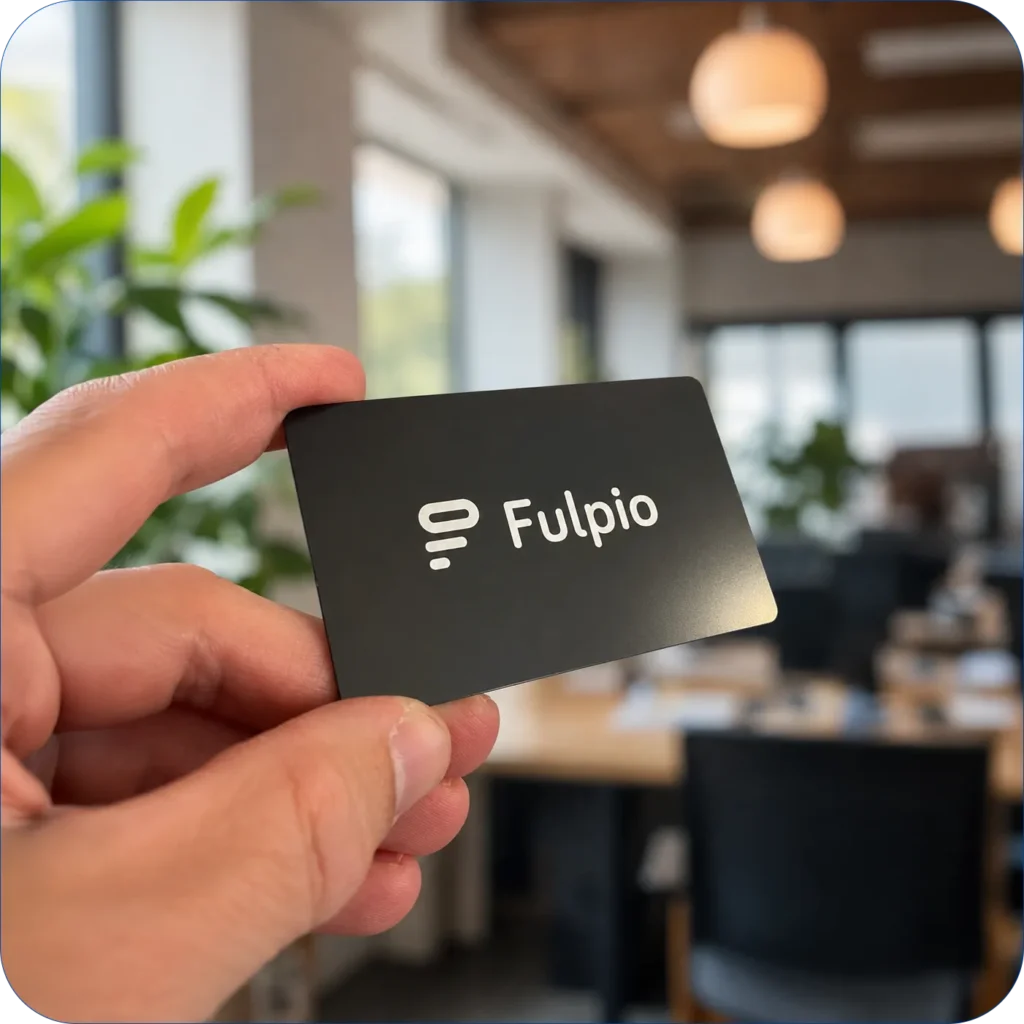
Before committing, open a sample profile on mobile and ask: Can a new contact understand my specialty in a few seconds? Is my best proof easy to find? Can someone contact or book me directly? Can I share the profile by link, QR code and, if useful, NFC? Can I update it myself?
Compare the profile experience as well as the physical device or subscription. A polished card cannot compensate for unclear content, and a good profile should work even when you share its link without a card. Explore Fulpio’s customizable profile templates, build a version around your services and portfolio, then test it with a trusted client before using it widely. Start with customizable profile templates and tailor one to your services and portfolio.
Create your digital business card for free. Forever.
And show the world more than just a contact.
A digital business card for networking events is most useful when it supports the conversation instead of replacing it. At a conference, trade show or business meetup, people move quickly between introductions. A profile that opens in seconds gives the other person a clear way to save your details, revisit your work and contact you after the event.
The technology alone does not create a valuable connection. The result depends on what you prepare before the event, how naturally you share the profile and what you do with the contact afterwards. This guide follows that complete workflow and shows where an NFC card, wristband, QR code and Fulpio profile fit.
Open your profile as a visitor and check the first screen on a phone. Your name, current role, company and profile photo should be clear without scrolling. Remove old campaigns, expired links and anything that belongs to a different audience. If the event has a defined theme, place the most relevant offer or project near the top.
Test every important action: call, email, website, portfolio, map and contact saving. Also check the profile on mobile data, not only office Wi-Fi. A digital card is reusable, so you can update its content for each event without replacing the NFC product or publishing a new QR code.
Our guide to what a digital business card should include helps you choose the essentials without turning the profile into a crowded company website.
Build the page around the next step you want from a relevant contact. A consultant may lead with a short service summary and booking link. A designer may prioritise a portfolio. A sales professional may need a brochure, product page or contact form. Keep one main action visually stronger than the rest.
Add enough context for someone who remembers your face but not every detail of the conversation. A recognisable photo, precise role, company name and one sentence about whom you help are more useful than a generic slogan. Include LinkedIn or another professional channel only when you maintain it actively.
NFC works well in a face-to-face conversation: the other person taps your Fulpio Easy, Steel or Band and the profile opens in the browser. A QR code is a useful alternative when several people need access, when the phone’s NFC is disabled or when you display the profile on a stand, badge or presentation.
A direct link belongs in the event chat, calendar invitation or follow-up message. You do not have to choose one method for every situation. The strongest setup gives people a fast primary option and a simple backup. Our comparison of NFC and QR code sharing explains where each method is most practical.
Do not begin the introduction by pushing a phone or card forward. First establish why you should stay in contact. When the conversation reaches a natural next step, say something specific, such as: “I will share my profile so you have the case study and my details together.”
Hold the NFC product near the upper part of a compatible phone and wait until the notification appears. If the tap does not work immediately, use the QR code or link instead of turning the moment into technical troubleshooting. Let the other person open the profile and show them the most relevant button only if helpful.
Sharing your own profile is only half of networking. If the conversation deserves a follow-up, ask for the other person’s preferred contact method. With a Fulpio Pro form, the visitor can leave selected details and a short message directly through your profile. Keep the form short enough to complete while standing.
Explain what will happen after submission. A sentence such as “Leave your email and I will send the example tomorrow” gives a clear reason to share data. Collect only information you genuinely need, use an appropriate consent statement and never add people to general marketing simply because they scanned your code.
A saved name without context becomes difficult to use after a full conference day. Directly after an important conversation, record one short note: the event, the topic discussed and the promised next step. Use tags or groups so that event contacts do not mix with clients, suppliers or personal connections.
Avoid writing sensitive opinions or unnecessary personal details. The purpose of the note is practical memory, not a hidden profile of the person. A useful entry might read: “Met at Design Summit – interested in booking integration – send demo on Tuesday.”
Follow up while the meeting is still easy to remember, ideally within one or two working days. Refer to the actual conversation, deliver anything you promised and suggest one reasonable next step. A personal message with one relevant link is stronger than a generic message sent to every badge scan.
Before sending, open your own profile again. The recipient may return to it from the saved link, so the content should still match the message. You can update a project, event offer or booking button without changing the NFC card or QR destination.

Fulpio Easy is light and practical for frequent contact sharing. Fulpio Steel creates a more formal, premium handover at client meetings. Fulpio Band stays on your wrist, which is useful when you are moving between sessions, working at a stand or do not want to search through a bag.
All three open the same type of updatable digital profile. Choose according to how you meet people, not only how the product looks. See the Fulpio NFC cards and wristbands and prepare the profile before deciding which format feels natural in your event routine.
After the event, review which links people used, how many saved your contact and which forms or booking actions were completed when those metrics are available in your plan. Treat the numbers as signals, not proof that every profile view became a business relationship.
Combine the data with your own notes. If many people opened the profile but few continued, simplify the first screen or strengthen the main action. If conversations were good but follow-up was slow, improve your tagging and reminders. The best digital business card for a conference is the one that helps a real conversation continue.
Create your digital business card for free. Forever.
And show the world more than just a contact.
A professional virtual background with a QR code can turn an ordinary video call into a simple contact-sharing opportunity. Instead of spelling out your email address or promising to send your details later, you can let participants scan the code and open your digital profile while the meeting is still in progress.
The background still needs to do its first job well: keep the screen clean, support your personal brand and leave your face easy to see. The QR code, name and call to action should help without distracting from the conversation. This guide explains how to balance all of those elements and test the result before a real call.
Decide on the destination before designing the background. A QR code can open a website, booking page, portfolio or contact file, but a mobile-friendly digital profile is usually the most flexible choice. It gives the visitor one place to call, email, save your details and continue to the most relevant link.
Avoid encoding a long list of fixed contact details directly into the image. If your phone number, role or portfolio changes, an old code may immediately become outdated. A QR code that opens one stable online profile lets you update the destination content without rebuilding every background.
Before generating the image, review the elements listed in our guide to what a digital business card should include. Keep the first screen focused on the action most useful after a video call.
Most meeting layouts work naturally with a horizontal 16:9 background. Use a high-resolution image, restrained colours and enough empty space around the position where your head and shoulders will appear. A busy office photo, strong pattern or several competing logos can make both your face and the QR code harder to read.
Choose a background that matches the type of meeting. A neutral branded design suits client calls and interviews. A webinar can carry slightly more visual information, but the result should still be understandable when your video tile becomes small.
The Fulpio virtual background creator lets you choose a layout and a gallery background or upload your own image. Your name, profile link and profile QR code are then added automatically before you download the finished background.
Your head and shoulders normally occupy the centre of the frame, so keep the QR code in an outer corner or side area. Leave a clear safety margin from the edges because meeting platforms may crop the background differently in gallery view, mobile view or a narrow window.
Do not put the code directly behind your shoulder, beside moving hair or near controls that cover the lower part of the screen. Also keep your name and role in a separate readable zone. The exact corner matters less than making sure the code remains visible throughout your usual posture and camera framing.
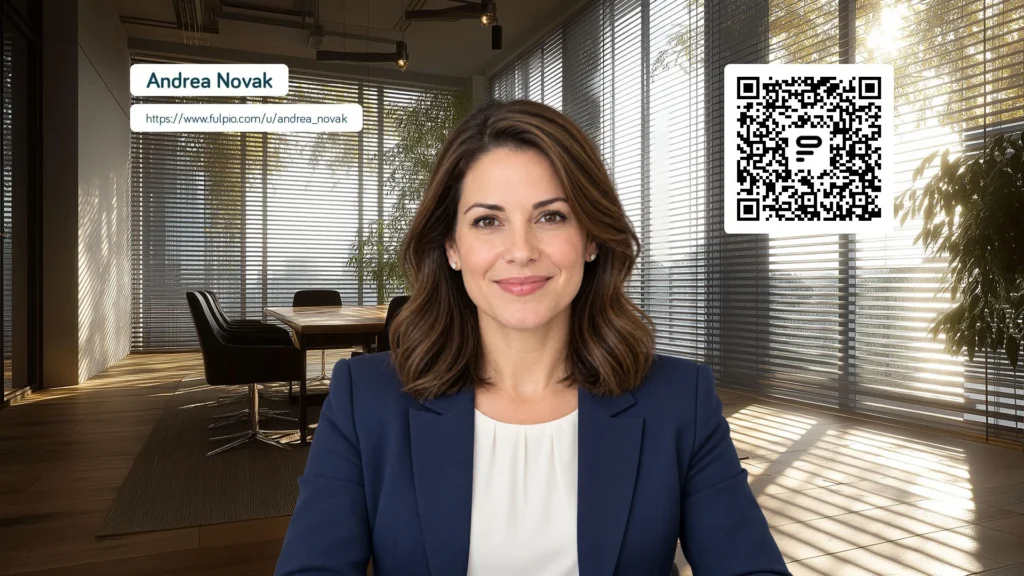
A code that looks sharp in the original file may become much smaller after video compression. Use a dark code on a light, plain field, preserve the clear border around it and never stretch it out of proportion. Decorative textures and low-contrast brand colours may look attractive but reduce scan reliability.
Test the size in a realistic meeting tile, not only in the full-resolution design. Ask someone to scan it from another device while your camera is running. If scanning takes several attempts, enlarge the code or simplify the area around it.
Add a short call to action such as “Scan to view my profile.” Participants should understand what will open before they point a camera at the screen. A visible profile link or a link shared in the chat is also a useful alternative for people joining from one device.
Many meeting apps mirror your own preview so it feels like looking into a mirror. Other participants may still receive the image correctly, which can make a readable background look reversed only to you. Do not redesign or flip the file based on the self-view alone.
Start a test call with a second device or ask a colleague to confirm how the background appears to other participants. Check both the text and QR code. If the platform provides a mirror-video setting, understand whether it changes only your preview or the outgoing image before adjusting anything.
Download the completed background as a clear JPG or PNG. In Zoom, open the video and effects settings, choose the background section and add your image. In Microsoft Teams, open Effects and avatars before joining, or Video effects during a meeting, then choose Add new. In Google Meet, open Backgrounds and effects and upload the image as a custom background.
Menus can differ slightly by device, account and application version. Always preview the result before joining. Some business accounts also restrict custom backgrounds through administrator settings, so prepare a plain branded alternative or share your profile link in the chat if the upload option is unavailable.
A final test should use the same laptop, camera position, light and meeting application that you normally use. Confirm that your face is separated cleanly from the background, your name is readable and the QR code remains unobstructed when you move naturally.
Then check the scan from different phone cameras and from the approximate size at which participants will see your tile. Open the destination and verify that it loads quickly on mobile. The broader comparison of NFC and QR code sharing explains why a direct link should remain available as a fallback.
A QR background works best as a quiet option, not as a permanent advertisement. Mention it when contact sharing is relevant: at the end of a presentation, during introductions or when someone asks for your details. Leave enough time for a scan and paste the profile link into the chat for people using a single screen.
For sensitive, internal or very formal meetings, a simpler background may be more appropriate. You can keep different versions for client calls, webinars and interviews while using the same profile destination.
The background is only the entrance. The profile it opens should contain a current phone number, email address, role, useful links and a clear next action. Review it before an important event and remove anything that no longer supports the conversation.
With Fulpio, the QR code on the background continues to open the latest version of your profile even after you update its content. Create your free Fulpio virtual meeting background, test it from another device and keep a direct profile link ready as a simple backup.
Create your digital business card for free. Forever.
And show the world more than just a contact.
You can share contact information without a paper business card by giving people a quick route to one online profile. In person, that route may be an NFC tap or a QR code. At a distance, it may be a link in a message, an email signature or a QR code on a virtual meeting background.
The strongest setup is not seven separate copies of your details. It is one current profile with several ways to open it. You can then choose the method that feels natural in each situation while the recipient reaches the same phone number, email, website and useful links.
NFC is convenient when you are standing beside the other person. They bring a compatible phone close to your NFC card, wristband or tag, receive a notification and open your profile in the browser. The interaction is fast and does not require them to type your details.
This method works well at client meetings, events, trade shows and service businesses where you regularly meet people face to face. You control the moment and can show the recipient where to tap. A physical NFC product also gives the exchange a deliberate, professional feel without handing over a disposable card.
NFC should not be your only route. Phone antennas differ, NFC may be disabled and some older devices may not support the tap. Keep a QR code or profile link ready as a fallback. The guide comparing NFC and QR codes explains when each method is stronger, while the Fulpio product range shows several physical formats for in-person sharing.
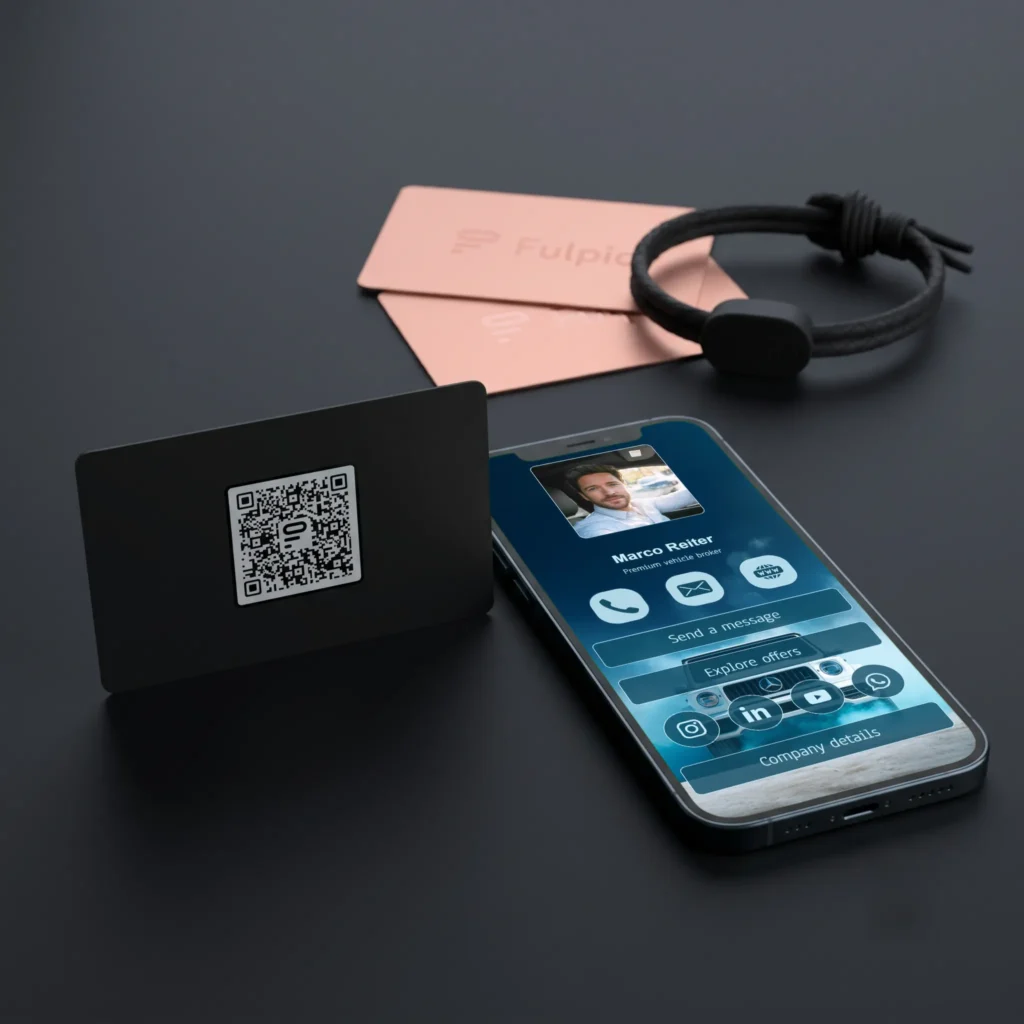
A QR code is one of the most flexible ways to share contact details. Display it on your phone, a name badge, a presentation, a counter sign or printed material. The recipient scans it with the phone camera and opens your digital profile.
QR works especially well when several people need access at once or when touching a device would be awkward. It can remain visible at a booth, on a screen or at the end of a presentation. It is also the practical backup for an NFC product.
Make the code large enough, give it strong contrast and leave clear space around it. Test it from the real viewing distance, not only from a few centimetres away. A QR code should lead to a mobile-friendly destination that makes the next step obvious.

A direct link is the simplest option when the conversation is already happening on a phone or computer. Paste it into an SMS, WhatsApp message, LinkedIn conversation or calendar invitation. The recipient can open it immediately and return to it later.
Add a short sentence that gives the link context: “Here are my contact details and the portfolio we discussed.” A bare URL is easy to overlook, while a personal follow-up reminds the person where you met and why the link matters.
Use one stable profile address rather than sending separate links for your phone, website and social channels. If a detail changes, update the profile instead of trying to correct every old message.
An email signature turns routine correspondence into a low-pressure sharing opportunity. Add a clear text link such as “View my contact details” or use a small QR code when the email is likely to be opened on a computer and scanned with a phone.
The destination should be more useful than a duplicate of the signature. It can offer tap-to-call and email buttons, social links, a portfolio, a map or a contact form. Keep the visible signature compact so it does not overwhelm the message.
Test the signature on desktop and mobile. Images may be blocked, resized or forwarded without context, so retain a clickable text link even when you include a QR code.
Online meetings do not provide a natural moment to hand over a card. A professional virtual background with your name, role and QR code can make your profile available without interrupting the conversation. You can also show the code on a final presentation slide.
Place the QR code away from your face and from interface controls. Use high contrast and test whether it remains readable when the meeting platform compresses or mirrors the preview. Tell participants what the code opens instead of expecting them to guess.
This method suits consultations, webinars, remote sales calls and online networking. Leave the code visible long enough to scan, then place the direct link in the chat for anyone joining from a single device.

Your phone can become the sharing tool you always carry. Save the profile link as a home-screen shortcut, keep the QR code in an easy-to-find album or use a wallet pass when your chosen platform supports one. The aim is to reach the sharing screen in seconds, not search through folders while someone waits.
This is useful when you did not bring an NFC card or when a spontaneous conversation begins. Increase the screen brightness before showing a QR code and avoid reflections that make scanning difficult.
Prepare the shortcut before an event and practise opening it. A simple, repeatable gesture is more reliable than depending on memory at a busy moment.
Social networks and messaging apps are natural places for a digital profile link because the relationship already continues there. Add the link to an appropriate bio, send it after a new connection or include it in a saved reply used for enquiries.
Do not post personal contact details publicly unless you want them public. A digital profile lets you choose what to display and gives you one destination to update. For a direct conversation, personalise the message and avoid sending an unexplained promotional link.
This route works best for informal networking, community groups, creator collaborations and follow-up after an event. It is less suitable when the recipient needs your details instantly during a face-to-face meeting; NFC or a QR code is faster then.
Use NFC for a smooth one-to-one meeting, a QR code for visibility and groups, and a direct link for remote follow-up. Put the link in your email signature for ongoing correspondence and use a QR background or presentation slide during online meetings. Keep a phone shortcut for unexpected encounters and use social messaging when the conversation already lives there.
You do not have to choose only one. Combine two methods that cover your most common situations and keep a third as a fallback. The comparison of a digital and paper business card can help you decide whether you still need printed cards for any part of your work.
Every sharing method becomes frustrating if it opens incomplete or outdated information. Check your phone number, email, links and main call to action before an event. Make the first screen easy to understand and give the visitor a clear next step.
Create or update your Fulpio digital business card, then choose the routes that fit your real conversations. The profile remains the same; only the way people reach it changes.
Create your digital business card for free. Forever.
And show the world more than just a contact.
Choosing an NFC business card or wristband is mainly about how and where you meet people. Fulpio Easy is a light plastic card with NFC and a QR code. Fulpio Steel gives the same tap-and-open experience in a heavier metal format. Fulpio Band keeps NFC on your wrist, ready when carrying a card is inconvenient.
All three can open the same Fulpio profile, so the information you share does not depend on the physical format. Your choice affects how you carry the device, how it feels in a meeting and whether you also want a visible QR fallback on the product.
Each product uses NFC to open a digital profile on a compatible phone. The other person brings their phone close to the device, receives a notification and opens the profile in a browser. They do not need a Fulpio account or app to view your details.
The profile can contain your contact information, social links, website, portfolio, map, video or a contact form. When something changes, you edit the profile rather than replacing the physical device. Our guide to NFC business cards explains the tap process in more detail.
The main difference is therefore not the destination. It is the object you use to start the interaction: a practical plastic card, a premium metal card or a wearable wristband.
Fulpio Easy is a plastic NFC business card with a printed QR code. It is available in nine colours, so you can choose a version that fits your style without turning the decision into a design project.
Easy works well when you want a familiar card format that is light, simple to carry and easy to hand over or tap. The visible QR code also gives the recipient another route to your profile if NFC is disabled or the phone’s antenna is difficult to find.
It is the most practical starting point for everyday networking, occasional meetings and anyone who prefers colour and simplicity over the weight of metal.
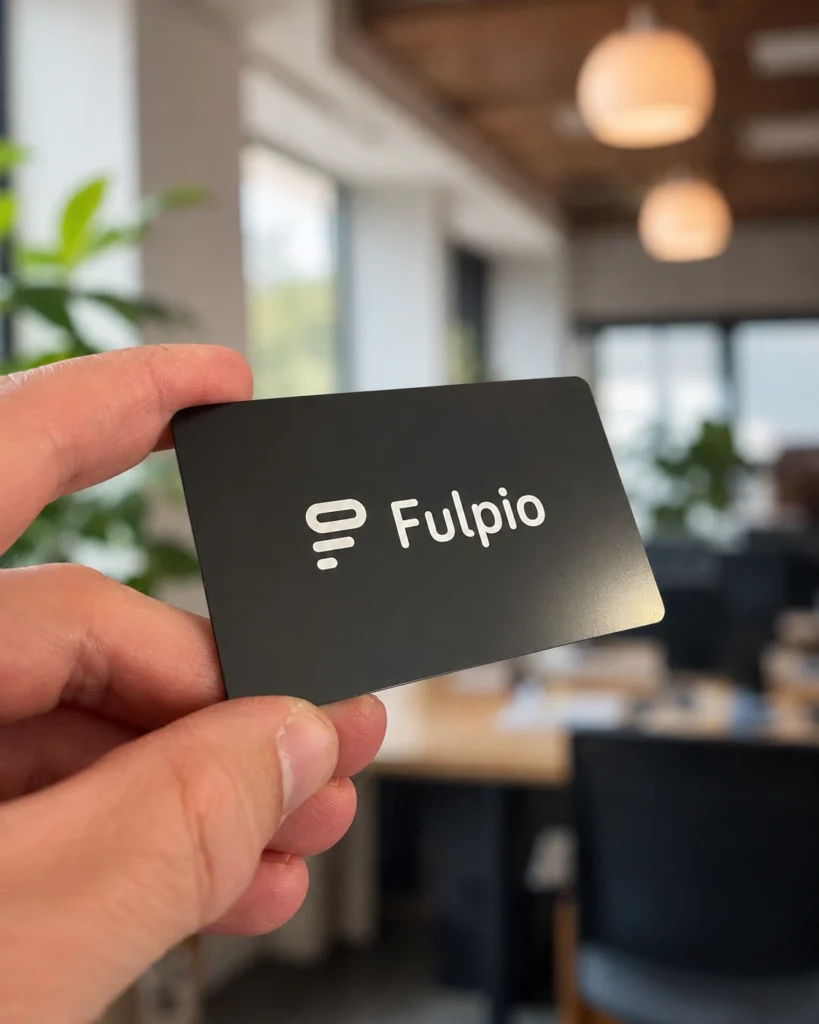
Fulpio Steel is a black metal NFC business card with a QR code on the back. Its weight and finish make it feel more substantial, which suits client-facing meetings where the object itself contributes to the first impression.
Steel is a good fit for consultants, sales professionals, founders and anyone who often meets clients in a formal setting. It shares the same type of digital profile as Easy, so choosing metal does not unlock different profile content. You are choosing the material, feel and presentation.
Fulpio Band is an adjustable silicone NFC wristband with an elegant design. The NFC element stays on your wrist, so you do not need to reach for a wallet, bag or card holder.
That makes Band useful for trainers, event staff, hospitality professionals, active service providers and people who regularly meet contacts while moving. Its water-resistant construction also suits everyday wear beyond an office.
Band focuses on the tap. Unlike Easy and Steel, the product itself is not built around a printed QR fallback. Keep your profile link or QR code available on your phone when you expect to meet a device without NFC.

A card is familiar. You can keep it in a wallet, place it on a desk and present it deliberately during a meeting. Easy is lighter and more casual; Steel feels more formal and substantial. Both also display a QR code.
A wristband is faster when your hands are busy or you do not carry a wallet. It is already visible and accessible, but you need to be comfortable wearing it regularly. The best product is the one that fits your routine without making you search for it at the moment of introduction.
Before choosing, picture your most common situation. Are you sitting across from a client, moving around an event, working with customers or meeting people outdoors? That context matters more than choosing the most expensive format.
Choose Easy if you want a light plastic card, a choice of colours and a visible QR backup. Choose Steel if you prefer a premium metal feel for formal business meetings. Choose Band if you want NFC permanently within reach on your wrist.
Whichever format you choose, test the tap position before an important meeting and keep your profile current. NFC makes the opening fast, but the profile still needs a clear photo, useful contact buttons and one obvious next action.

There is no single best format for everyone. Easy prioritises practicality and colour, Steel emphasises material and presentation, and Band prioritises immediate access while you are moving. All three connect people to an updatable profile without requiring them to install an app.
Compare the three options in the Fulpio product range and choose the device you will feel comfortable carrying or wearing every day.
Create your digital business card for free. Forever.
And show the world more than just a contact.
If you are deciding what to put on a digital business card, begin with the information a new contact needs in the first few seconds: who you are, what you do and how to reach you. Then add content that supports one clear next step.
Digital space is flexible, but it is not unlimited attention. A profile with every phone number, social account and old project can be harder to use than a paper card. The goal is not to add everything; it is to make the right information easy to find.
The first eight items form the practical core. They help someone recognise you after a meeting, understand your relevance and contact you without searching elsewhere.
Use the name you introduce yourself with and that people will search for later. Keep spelling, titles and professional suffixes consistent across your website, email and social profiles.
For a personal professional profile, a current headshot helps people connect the card with the conversation. For a company or venue profile, a recognisable logo may be more appropriate. Use a sharp image with a simple crop.
State your job title in language a client understands, followed by the company or brand. An internal title may sound impressive but still fail to explain how you can help.
One or two lines should explain what you do, for whom and what makes your work relevant. Treat it as orientation, not a full biography. The opening screen should remain easy to scan.
Include the number you actually answer for professional conversations. If you add more than one, label each clearly—for example mobile, office or customer support—so the visitor does not have to guess.
Use an address you monitor and that matches your professional identity. A role-based address can work for teams, while an individual address makes a personal follow-up feel more direct.
Link to the page that best continues the conversation, not automatically to a generic homepage. This might be your services, current listings, portfolio or booking page.
Let the visitor move your details into the phone’s contacts with minimal effort. Check the downloaded contact data regularly, especially after changing a role, number or company.
If you are new to the format, our guide to what a digital business card is explains how these elements work together in one online profile.

The next seven items are not mandatory for everyone. Add them when they answer a real question, demonstrate your work or make the desired action easier.
Choose active professional channels rather than displaying every account you own. LinkedIn may matter for a consultant, Instagram for a designer and YouTube for a trainer. Remove inactive or private profiles.
Decide what the visitor should do next: call, request a quote, book a meeting, view properties or open a catalogue. Use a specific button label instead of a vague “Click here”. One primary CTA is usually stronger than several competing ones.
If appointments are central to your work, link directly to the available times. This is useful for consultants, salespeople, trainers and service professionals because it removes a round of messages.
Add a business location when people visit you, need directions or judge service availability by area. Avoid publishing a private home address unless you deliberately use it as a public business location.
Show a small, curated selection of work rather than an endless archive. Real-estate listings, completed projects, designs, dishes or before-and-after examples can communicate quality faster than a long paragraph.
A concise introduction, product demonstration or showreel can add personality and context. Keep it relevant, captioned where possible and short enough that a new contact will realistically watch it.
A simple form lets an interested visitor send their own details, inquiry or service preference. Ask only for information you need for the follow-up. Every extra field increases effort and may reduce completions.
Fulpio profiles can combine contact blocks, links, maps and richer media in one structure. See how a digital profile works before choosing your content order.

Give each element a job. If a link does not help the visitor understand, trust or contact you, remove it. Put identity and primary contact actions near the top, group related links together and move supporting media lower down.
Create the profile for a specific audience. A real-estate agent may prioritise listings and a viewing request, while a speaker may lead with a showreel and event inquiry. If you serve very different audiences, separate profiles can be clearer than one overloaded page.
Use the available Fulpio profile templates as a starting structure, then customise the content instead of filling every possible block.
Do not publish private details merely because the format allows them. Leave out personal addresses, private social accounts, confidential client information, outdated credentials and documents that were not intended for public access.
Also remove duplicated routes and weak content: three nearly identical websites, five phone numbers without labels, broken social links, low-quality images or an old promotional video. Accuracy and relevance build more trust than volume.
Start with identity: photo, name, role, company and short value statement. Follow with the easiest contact actions, then the main CTA. Place proof and richer content—portfolio, video, social links and form—after the visitor understands who you are.
Review the profile on a phone, not only in the editor. Ask whether a person who met you thirty minutes ago can recognise you, understand your offer and contact you within ten seconds. Test every button and update the content whenever your professional details change.
The best digital card is complete without feeling crowded. Start with the eight essentials, add only the optional elements that serve your goal and choose one clear next action. Explore the Fulpio application or create a customisable Fulpio digital business card built around the information your contacts genuinely need.
Create your digital business card for free. Forever.
And show the world more than just a contact.
No. People do not need to install an app to view a Fulpio digital business card. When someone taps your NFC card, scans your QR code or opens your profile link, the phone launches the profile in its standard web browser. The visitor does not need a Fulpio account either.
That distinction matters in real networking. Asking a new contact to find an app, download it and register creates unnecessary friction. A **digital business card without an app** keeps the first step familiar: open a web page, view the details and choose what to do next.
The three usual routes are NFC, QR and a direct web link. An NFC card or tag stores a short instruction—normally the address of your online profile. A compatible phone reads it and shows a notification. After the recipient taps that notification, the browser opens the profile.
A QR code works similarly. The phone camera reads the code and offers the same web address. A link sent by email, message, social media or an email signature skips the physical step and opens directly. All three methods can lead to one current profile.
If you want the broader concept first, our guide explains what a digital business card is and what it can contain.
The NFC chip and QR code act as signposts; they do not need to carry your full profile. The phone reads the destination, asks the user to open it and loads the page in Safari, Chrome or another default browser. An internet connection is normally required to load the online profile.
Because the content lives online, you can update your role, phone number, links or portfolio without changing the NFC product or printing a new QR code, as long as the destination stays the same.
Yes. A profile can provide actions such as calling, emailing, opening a website or downloading contact details. Saving a contact usually uses the phone’s standard contact workflow, often through a vCard file. The exact confirmation screen varies between iPhone and Android, but a separate viewing app is not required.
The recipient remains in control: viewing the profile does not automatically save every detail or install software. They choose which action to take, just as they would on any mobile website.
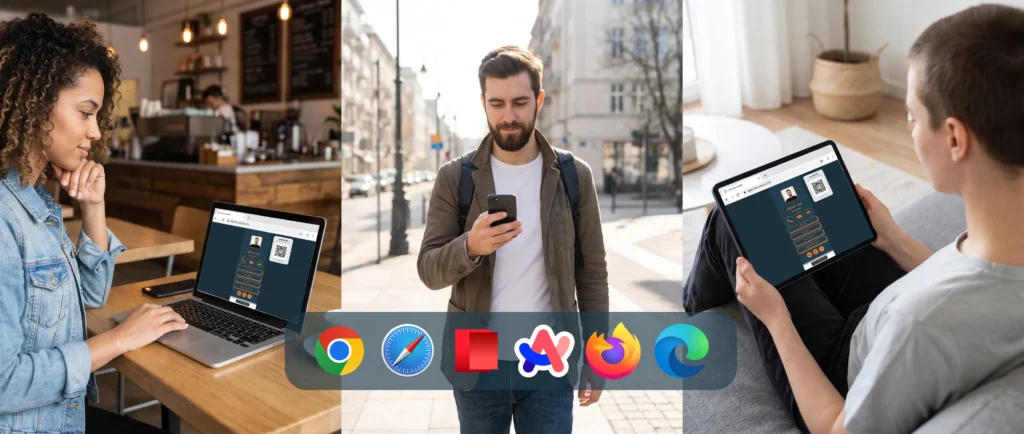
The app is useful to you as the profile owner. It gives you a convenient place to create, edit and manage what people see. That is different from the recipient experience. Your visitor only needs a browser, while you can use the Fulpio application to keep your profile accurate.
This owner-versus-visitor distinction is useful when presenting the product to a team. Employees may use management tools, but clients and event contacts should not face an installation requirement.
Yes, provided the phone can open a web link. NFC support and antenna position vary by device, so a visible QR code is a valuable fallback. If NFC is unavailable or disabled, the recipient can scan the QR code or receive the direct link instead.
The destination remains the same on both platforms: a mobile-friendly Fulpio digital profile. That consistency makes the sharing experience easier to explain and test.
Open the profile on both an iPhone and an Android phone. Test the NFC tap, scan the printed QR code and send the direct link to yourself. Check that the profile loads quickly, buttons work, your contact file saves correctly and your most important details appear near the top.
Also test outside your logged-in account. That simple check shows the exact public experience a new contact will see and confirms that no sign-in prompt blocks the page.
It removes a decision at the most important moment. Your contact can focus on who you are, what you offer and how to reach you—not on storage space, app permissions or registration. NFC makes in-person sharing fast, QR expands compatibility and a link covers remote conversations.
For a practical setup, use one current profile and offer all three paths. Explore Fulpio NFC cards, wristbands and tags or start with a Fulpio digital business card that recipients can open immediately in their browser.
Create your digital business card for free. Forever.
And show the world more than just a contact.
Yes. An NFC business card works with compatible iPhones and Android phones, and the recipient normally does not need to install an app. On newer iPhones, NFC tag reading is usually available automatically. On Android, support depends on the phone model and NFC may need to be enabled in the settings.
The experience is simple when the phone, setting and tap position are right: hold the card close to the phone’s NFC antenna, wait for a notification and tap it to open the digital profile in the browser. If a phone cannot read NFC, a QR code or direct profile link provides a practical alternative.
The phone needs NFC hardware, permission to read the tag and a browser that can open the stored web address. It also needs an internet connection to load an online profile, even though the short NFC instruction itself can be read without mobile data.
The card does not pair with the phone through Bluetooth, does not require charging and does not install anything. Its chip normally contains a link. When the phone reads that link, it shows a notification and leaves the recipient in control of whether to open it.
This is the same basic process described in our guide to how NFC business cards work. The important compatibility question is therefore not which app the recipient uses, but whether the phone can read an NFC tag and where its antenna is located.
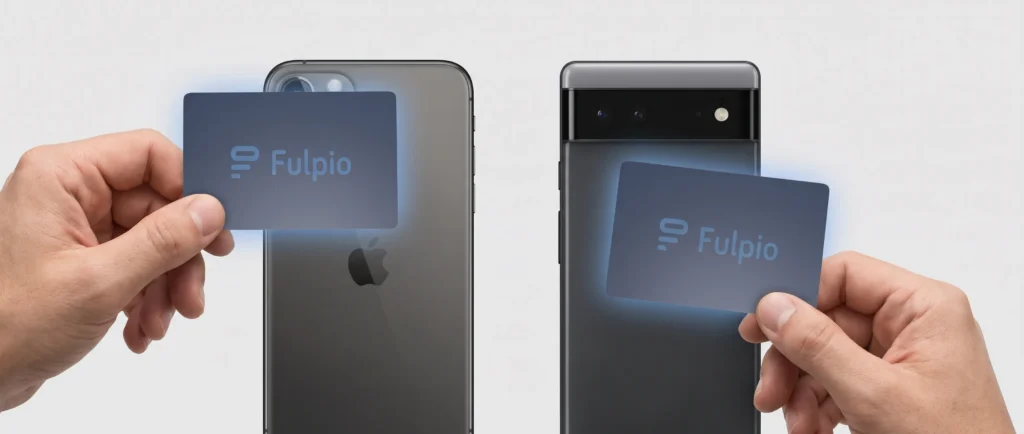
Fulpio’s maintained compatibility guidance covers supported iPhone generations and the difference between older and newer reading behaviour. As a practical rule, modern iPhones can read NFC tags, while newer models offer the most seamless experience because background NFC reading does not require a separate reader app.
On a compatible iPhone, unlock the screen and hold the upper part of the phone close to the NFC card. Keep the card still for a moment and move it away once the notification appears. You do not need to press the card hard against the phone.
Older supported models may require a manual NFC reader or a different workflow depending on the iOS version. Rather than relying on a model list that can become outdated, use the localized NFC compatibility guide when you need to check a specific device.
The NFC reading area on an iPhone is generally near the top edge of the device. Bring the card close to the upper back or top portion of the phone, not the centre of the display. A slow, deliberate movement works better than waving the card over the whole phone.
The screen should be awake. If nothing happens, remove the card, wait a second and try again at a slightly different angle. Thick or magnetic cases can reduce the effective reading distance, so removing the case is a useful troubleshooting step.
Android compatibility varies more because many manufacturers produce phones across different price ranges. Most current mid-range and premium devices include NFC, but some models do not. The clearest test is to search the phone’s settings for “NFC”, “Connections” or “Connected devices”. If an NFC switch is present, turn it on.
On many Android phones, the NFC antenna sits around the centre or upper part of the back. The exact position can differ by brand and model. Hold the card flat against that area for a moment. If the notification does not appear, slide the card slowly up or down rather than repeatedly tapping at random.
NFC settings may also be available in the quick settings panel. The recipient does not need to configure a payment card: reading a web link from a business card is separate from making a contactless payment.
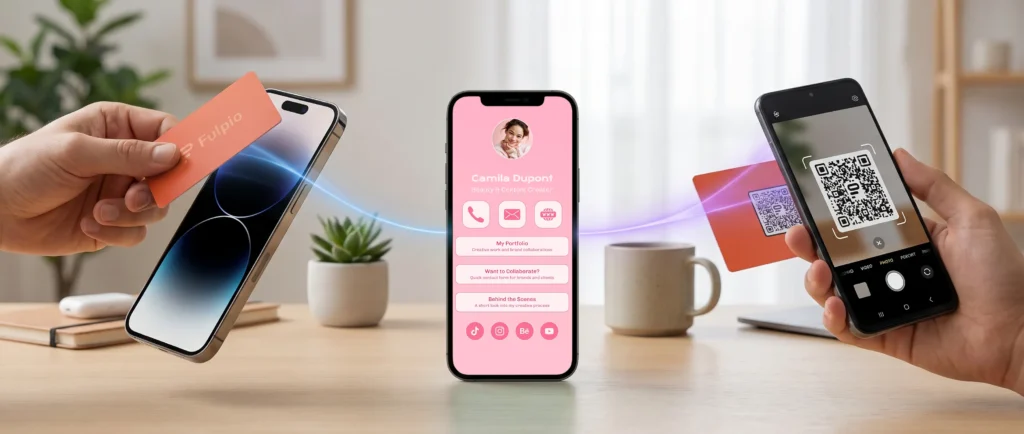
No. A compatible phone reads the link and opens the profile in a standard browser. The recipient can view your details without a Fulpio account and can choose whether to save, share or use the information you make available.
The app is relevant to the profile owner for creating, editing and managing a profile. It is not a requirement for the person receiving the contact. This distinction removes one of the biggest barriers in real meetings: you do not have to ask a new contact to download something before seeing your details.
A failed first tap usually does not mean the card or phone is incompatible. Common causes include the wrong antenna position, NFC being turned off on Android, a locked or sleeping screen, the card being moved too quickly, another NFC card nearby, or a thick case between the chip and antenna.
Try this short sequence:
1. Wake and unlock the phone.
2. Confirm that NFC is enabled on Android.
3. Separate the NFC card from other cards or a wallet.
4. Hold it still against the likely antenna area for one to two seconds.
5. Remove a thick or magnetic case and try once more.
6. Use the QR code if the phone still does not respond.
The digital profile can still be shared. A visible QR code can be scanned with the phone camera, and a direct link can be sent through email, a message or a social network. The destination remains the same; only the path to it changes.
This is why the best practical comparison is not iPhone versus Android. It is tap plus fallback. Our guide to NFC versus QR code explains when tapping is fastest and when scanning is more flexible.
A QR code is especially useful with older phones, models without NFC, disabled settings, unusual cases or situations where the recipient is viewing your contact details on a screen or printed material rather than standing next to you.
Use one current digital profile and give people more than one way to reach it. **NFC business card iPhone Android** compatibility is strongest in practice when the physical product also carries a visible QR code and you can send the same profile as a link.
Before an event or client meeting, test the NFC tap on at least one iPhone and one Android phone. Learn the most likely tap areas, keep the QR code unobstructed and avoid placing the NFC card directly against other contactless cards. A ten-second test prevents awkward troubleshooting during an important introduction.
Fulpio’s NFC cards, wristbands and tags combine fast contactless sharing with a QR option on supported products. Both methods can lead to the same profile, so changes to your phone number, role, links or portfolio remain available without reprinting the physical device.
With a modern iPhone or an NFC-equipped Android phone, probably yes. The key differences are whether NFC needs to be enabled and where the phone’s antenna is located. You can confirm uncertain devices on the maintained compatibility page instead of memorising a long model list.
For the most dependable real-world setup, use NFC for the fastest in-person interaction, QR for broad compatibility and a direct link for remote sharing. That combination makes a Fulpio digital business card useful across iPhone, Android and the many situations where a tap is not the best option.
Create your digital business card for free. Forever.
And show the world more than just a contact.
NFC is usually the fastest option when two people are standing together: you hold a card or another NFC device close to a compatible phone, the phone shows a notification and the recipient opens your profile. A QR code takes an extra camera step, but it works on a wider range of phones and can be scanned from a card, screen, poster or printed material.
So which is better? For face-to-face contact sharing, NFC often feels quicker. For universal access and situations where people are not close enough to tap, QR is more flexible. The strongest setup is not NFC instead of QR, but both methods pointing to the same up-to-date digital profile.
NFC, or Near Field Communication, uses a small chip and antenna inside a card, wristband or tag. When the device comes very close to a phone’s NFC reading area, the phone reads the stored instruction, normally a web address. The user then taps the notification to open it.
A QR code is a visible two-dimensional pattern that encodes information such as the same web address. The recipient points a phone camera or QR reader at the code and taps the detected link.
In both cases, the technology is mainly a path to the destination. Your name, telephone number, email, website, social links, gallery or form normally live in the online profile rather than inside the NFC chip or QR image. If you want to see the tap process in more detail, read how NFC business cards work. The Fulpio information section also explains the wider relationship between an NFC business card and its digital destination.
When the phone supports background NFC reading and you know the correct tap area, NFC is hard to beat for speed. You bring the card close to the phone, wait for the notification and move it away. There is no need to open the camera, frame a code or adjust the distance.
That makes NFC feel natural at a client meeting, trade fair, property viewing or networking event. The physical gesture also gives you a clear moment to explain what the recipient is about to open.
QR is still quick, especially when the code is already visible and well sized. However, the recipient usually has to open the camera, point it steadily and wait for recognition. Poor lighting, reflections, a damaged print or a code that is too small can slow the scan.
Speed also depends on familiarity. Some people recognise a QR code immediately, while others may not know where the NFC reader sits on their phone. A good host should be ready to switch methods without turning the conversation into technical support.
QR code scanning has the broadest practical compatibility. Most modern smartphone cameras recognise QR codes directly, and a code does not depend on the phone having an NFC chip. It is therefore a reliable option when you do not know what device the other person uses.
NFC support is also common, but behaviour varies. Newer iPhones and many Android phones can read a suitable NFC tag, while some models need NFC enabled or have the reading area in a less obvious position. Accessories such as a thick case, metal plate or another contactless card may interfere.
You do not need to memorise model lists. Use Fulpio’s maintained NFC compatibility guide when you need to confirm the main requirements. In everyday sharing, the printed QR code is your built-in fallback when tapping is unavailable.

NFC needs very close physical proximity. That is its strength in a direct conversation, but it also limits where you can use it. A person cannot tap a card shown inside a social post, presentation or video call.
A QR code can travel wherever it remains large and clear enough to scan. You can display it on your phone, place it in an email signature, presentation, brochure, event badge, shop counter or virtual meeting background. Several people can scan the same displayed code without you handing over a device.
NFC products work best when you control the physical touchpoint. A card is convenient for meetings, a wristband can suit an event or active work setting, and a tag can stay attached to an object. Fulpio’s range of NFC cards, wristbands and tags combines the tap with a QR option on supported products, so the recipient can choose.
The short interaction can happen without mobile data: a phone can read the URL from an NFC chip or decode it from a QR code. But when that URL points to an online digital profile, the phone normally needs an internet connection to load the page.
Neither method should therefore be described as a complete offline business card. They carry the route, not the full website. In a place with weak coverage, the notification or detected link may appear while the profile waits to load.
This is another reason to keep the destination lightweight, mobile-friendly and easy to recognise. It is also wise to keep essential visible information on the physical product when the context requires it, while using the online profile for details that can change.
Both methods commonly share a link, and the recipient chooses whether to open it. NFC works only at very short range, so a deliberate close interaction is normally required. A QR code is visible and can be scanned from farther away, which is useful for reach but also means anyone who can see it may open the public destination.
Neither NFC nor QR automatically gives the card owner access to the recipient’s contacts, files or payment data. The important security question is where the link leads. Use a trusted domain, keep the profile accurate and avoid publishing private information that should not be available to everyone with the link.
For the recipient, the same rule applies as with any web address: check that the destination looks genuine before submitting information or taking another sensitive action.
Choose NFC as your primary method if most exchanges happen face to face and you value the fastest possible gesture. It is particularly useful for sales meetings, consultations, events, showrooms and property viewings, where a physical card or wristband is easy to present.
Choose QR as the primary method when the profile needs to be opened from a screen, printed surface or shared display. It is also the safer compatibility choice for a mixed audience and a useful option when several people should access the same destination.
Use both when you want the conversation to keep moving regardless of the phone or setting. Start with the tap because it is quick. If NFC is disabled, unsupported or awkward to position, turn the card over and let the person scan. The destination stays the same, so you are not maintaining two separate profiles.

The biggest advantage of combining NFC and QR is consistency. Both can point to one address, and that address can open one profile that you update whenever your details change. You do not need a new QR code after every edit, and a paired NFC product can continue opening the same current content.
Before an important event, test both routes. Tap the NFC area on more than one phone, scan the printed QR code from a realistic distance and check the buttons in the profile. Make sure the code has sufficient contrast and clear space around it, and do not place it on a highly reflective or sharply curved surface.
NFC wins on speed at close range. QR wins on visibility, placement options and near-universal access. Neither replaces the other in every situation, and neither contains the real value on its own. That value lives in the profile people reach after the tap or scan.
With a Fulpio digital business card with QR code and NFC, you can offer both routes to the same always-current profile. Use the method that feels natural in the moment, keep the other ready as a fallback and make sharing your contact details simple for the person in front of you.
Create your digital business card for free. Forever.
And show the world more than just a contact.